You can sort the player list by player's name, rating, experience, status, host, client, color, or buddy flag.
Changing the sort order
Click the column header in the player list to sort by name, rating, status, experience, or host. To sort by color or buddy flag, you must use the Player > Sort submenu.
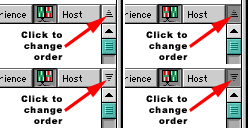
Click the small icon above the right scroll bar to change from ascending to descending order.
Saving the sort order
MacFIBS keeps track of your sort order automatically, and will restore the order you had last set when you launch MacFIBS again.
Multiple sort criteria
MacFIBS keeps track of primary and secondary sort criteria, using the previously selected sort field as the secondary criterion. For example, if you sort the players first by rating, and then by status, the players will be sorted first by status, then by rating with status.
Related topics
Table of contents